


Choppers, Bikes, India, Indian
Read more!
Showing posts with label Technology. Show all posts
Showing posts with label Technology. Show all posts
Saturday, January 31, 2009


Wednesday, August 27, 2008
Port Forwarding in Airtel Modem Beetel 200BX


Lot of people have asked me to help them with port forwarding. So here is the post to do the same.
When do u need port forwarding:
Typically
when you want computers outside your LAN to access your computer. Some
examples can be when u set up a ftp server on my machine for other
people to access, or you are running a bittorrent client such as utorrent, or when you want to play Age of Empires on the network.
Steps:
- Put an internal static IP on your machine.
- Open Network Connections. Right click on Local Area Connection and select Properties.
- Now select TCP-IP and click on Properties. Put values as shown. The DNS Server values I have put are that of opendns. You can also put 192.168.1.1 to use the airtel dns.

- Open Network Connections. Right click on Local Area Connection and select Properties.
- Configuring the Airtel Modem.
- open url http://192.168.1.1/main.html
- Advanced Setup -> NAT -> Virtual Servers
- the Server IP would be same as the IP Address above, which is 192.168.1.10 in this case.

- If
you want to play Age of Empires, you can just select this from the
dropdown (it is pre-configured). Click on Save/Apply and you are done. - In
case the service isn't pre-configured, such as utorrent. Click on
Custom Service. Put name utorrent (anything, doesn't matter) - You
would need to put which port to forward. utorrent typically runs on
19556, so put 19556 in all the four text fields i.e. External Port
Start, External Port End, Internal Port Start and Internal Port End. - Choose the protocol. In case of utorrent, and in most other cases, it would be TCP. Click on Save/Apply.
- Thats all. Port Forwarding should start working right away. As always, please write a comment if you reach this step :-)
- open url http://192.168.1.1/main.html


Sunday, July 13, 2008
Google launches Friend Connect - a social network for your site
On yesterday, i.e. 12th May, Google rolled out yet another service called Friend Connect.
Friend Connect is an application for website owners that allows any
site owner to add social features to their website. Friend Connect
offers site owners gadgets created by Google and OpenSocial developers
using which any site can be turned into a social network, allowing
visitors to interconnect with other users. This doesn't mean that
visitors will have to sign up with yet another social network, because
Friend Connect is a network of social networks, that interconnects
users across several social networks like Orkut, Facebook, Hi5 etc.

Friend Connect integrates with contact lists for social networks like
Facebook, orkut and Google Talk. This means that users who join a site
are instantly connected with friends who are already members, and can
invite friends from other networks to visit. They can opt in to
broadcasting their activities to friends in their social networks. A
post to a message board on one site, for example, can instantly be
visible to people in multiple social networks. These instant networks,
combined with the wealth of OpenSocial gadgets, can form potent new
online communities, very quickly and very easily.
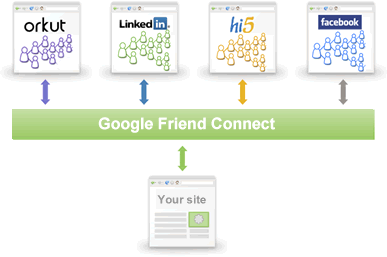
A website running social gadgets from Friend Connect will provide such features to the visitors as:
- sign-in with their existing Google, Yahoo, AIM, or OpenID account
- invite and show activity to existing friends from social networks such as Facebook, Google Talk, hi5, orkut, Plaxo, and more
- browse member profiles across social networks
- connect with new friends on any site
For website owners, adding a snippet of code to their site is all it takes to join this new platform of social networking.
At
present Google Friend Connect is just a preview release and is made
available to only a limited number of site owners. Interested site
owners can apply for an account.
Friday, July 11, 2008
Why i hate Weblogic Workhop & Portal
My current work requires me to maintain and enhance an Weblogic
Portal application. I’ve inherited it and the first thing
i’ve noticed is that it actually does not need portal at all.
It’s just 3 portlets and user has no ability to personalize it so
simple jsp with 3 includes or Struts tiles (or Sitemesh) would do..
But this is not what this story is about. Before that project i was
a happy Eclipse user (and i’ve been using Idea, NetBeans, Joe and
Vi too
) working on different projects in different j2ee scenarios. And out of
the suddent i’m in the middle of the strange weblogic world..

My first reaction after starting up and playing around a bit with workshop was “File/Exit” start up Eclipse…
But since the guys here did everything using pageflows and bea
portlets so unless i want to do everything manually (pageflow
annotations, portal xmls etc.) and use ant build that takes ages ,
i’m trapped in Workshop.
And why i hate is so much? Just take a look:
- Workshop sucks as a java editor. It does not have 1/100 of needed
features. Not even a simple “generate getters/setters”.
Probably that’s why in the code I’ve inherited from
consultants they avoid getters and setters like fire and access the
fields directly
Ok, maybe not just because of this… BEA should eat their pride
and build something on Eclipse or offer a decent set of plugins.
Workshop realy feels medieval and visual pageflow editors does not help
since most of us spend most of the time in the source code window.
- The editor does not do incremental builds of the whole project so
to notice errors not in your current file you have either to open the
offending file by mistake or do the full build. To illustrate this:
open a class file and change a commonly used method name and save it.
Any errors? Nopes..
- If you work in the ‘iterative development’ mode (where
you rely on the weblogic server to notice changes and recompile stuff
for you - because you do not want to do full build every time, belive
me) and you make a mistake like the one above it’s even worse - i
had one example where the server, after i saved the modified file,
acted like it actually does the right thing, the app was quickly
redeployed (luckily weblogic has 2 redeployment modes quick and full)
but it acted like nothing has changed (=still running my old class).
And no error message on the console 
- Then you finally decide to do the full build to see all the errors
and the build takes AGES. Not only it rebuild all the files in the
project no matter if it makes sense or not but it also compiles tons of
.jcx files (weblogic controls). To make the matter worse i use only 2
of them in the project but it recompiles all of them EVERY SINGLE TIME.
You think i did something wrong with my project? No way
Do the following exercise: create a fresh weblogic portal project and
cling on build… you see? click on build again.. oh.. it does it
again.. If you know how to disable this i beg you LET ME KNOW
- EJB overdose and un-modularity of the portal itself: the portal
consists many ejbs that get deployed whenever you need/want them or
not. And i’ve found no way to disable it and i would realy like.
You see, we use Portal just as a portlet container + skin manager. I do
not need the content manager etc. But nevertheless i have it
It steals my time and resources. I had to resort to some tricks to slim
it down a bit. They are unsupported (editing the original .jar files
and removing descriptors inside them - i could not remove the whole jar
as they also contain classes used by other portal modules) and when i
will upgrade to another service pack i will have to start my fun
again…
- BEAs strange update policy. To my knowledge BEA is not releasing
any hotfixes for general consumption. They only release “Service
Packs” from time to time. The problem with them is that they also
add features and not only fix bugs. You may like it with you Windows XP
service pack when you get some new stuff for free but i do not like it
with my “enterprise” software stack. Last time i did SP3
update of a project it happily changed my deployment descriptors and
actually re-enabled all the beans and other things I’ve carefuly
disabled by hand. It has also added few new EJBs for my pleasure and
joy. Silently and without asking. It has also modified my domain
configuration and added new authenticator that did not even work in my
case so the whole authentication in my app went down.
- Lack of good information on the web. I consider myself quite good
in the regard of google usage. But no matter what i did i could not
find solution for half of my bea problems on the web. The reason for
this is probably simple: most of the heavy action occurs between bea
consultants and paid customers and it never sees the light. So the only
thing left are the public forums (they are OK but did not help in my
cases) and the rest of the net that does not seem to care about
weblogic that much. With any decent/mainstream opensource project i can
find a good mailing list that have solutions for most of my problems
(I’m almost never the first guy to have them).
And guess what.. i will do my best to de-BEA-ize this application
ASAP. Then i will also de-Portal-ize it. Cause i’m just fed up
with all this crap.
But before that happen, i’ve a gut feeling that it’s not my last bea related post..
Wednesday, July 9, 2008
Unlimited free stuff from the web
One of the best things you can have as a frugal master is an internet connection and a bit of time.
We all know that some of the best deals
can be found on the net, but many people don’t realize just how
many things you can get completely free of charge.
For this article I’ve gathered a selection of some freebies from around the web.
I suggest you create a free email address
solely for signing up to these deals. This way, their emails
don’t get mixed up with your personal daily email.
Free Food
Food is essential and will likely take up fair amount of anyones frugal budget, so getting samples for free is a great lift 
Quaker Simple Harvest Choose a free dark chocolate chunk granola bar or maple sugar pecan instant oatmeal.
QuCinnabon Get free Cinnamon Rolls or Cinnamon Stix.
Shape Works Free Protein Bar Sample.
TCBY FREE* TCBY frozen yogurt & more.
Marie Callender’s Eat for FREE at Marie Callender’s
Attune Free Probiotic Bar - They are giving away 100 bars per Day, so visit in the morning asap.
Explorer’s SHoTexas Receive a free sample of the best habanero H.O.T Sauce.
API Request a free Vegetarian Starter Kit.
Spitz - A free Bag of Sunflower Seeds.
Cheerios Free Sample of Multi-Grain Cheerios from Walmart.
Hendricksons Receive one free sample packet of Hendrickson’s Original Sweet Vinegar and Olive Oil.
Free Cookware Brand New Rachael Ray Cookware Set Giveaway
Pizza Promotions Totally Free Pizza Gift Certificates from Pizza Hut, Dominos, or Papa Johns. No purchase necessary!
Sun Crystals Free Natural Sweetener Sample.
Tapena Receive your FREE Pinchos (a set of 4 Spanish kebab skewers & a delicioso recipe).
Nutri-Grain Free Apple Cinnamon Nutri-Grain Bar.
Splenda Free Sample of French Vanilla Sweetener.
Scholastic Free Sample of Teddy Grahams
Romano’s Macaroni Grill Sign up for the first word on their chefs’ latest creations, and get a free appetizer and more.
Trident Free Flavored Gum Sample- handy to have with the free condoms offered in this post 
Hunts Snack Pack Free Pudding Cups
Oreo Mini Get Your 8-Pack Sample of New Creme Filled Mini Cookie.
Yo Baby Yogurt Free YoMommy Yogurt 4-Pack.
Fiber One Free Sample of Fiber One Caramel Delight Cereal.
Free Jelly Belly Get your free sample of Jelly Belly candies
AlsoSalt Free Salt Substitute sample.
Garlic Gold If you like garlic, you’ll LOVE Garlic Gold
Great Sunflower more Free Sunflower Seeds.
Pop Tarts NEW Hot Chocolate Flavored Pop Tarts
Stevita Free sample of a natural sugar substitute.
Wing-Stop 10 Free Wings at Wing Stop.
Fiber 35 Free Fitsmart Bar.
LoSalt Free Sample Of LoSalt.
iKon Panini Press EM Send Out A Limited Number Of Samples Per Week.
Fast Food Survey Get a $50 gift card For KFC Or Tacobell.
Snackwell’s Get a Free Sample of Snackwell’s Devil’s Food Cookies.
Just Like Sugar Free sample of all natural, zero calories.
Oreo Get a free sample of Oreo Cakesters
Nestle Crunch Crisp Premium Try decadent Crispy Wafers Covered with Creamy Chocolate.
Bragg Free Bragg Health Facts Info Package with a sample of Bragg Liquid Aminos.
ECLIPSE Sugar-Free Chewing Gum Unleash An Icy Cool Burst of FLAVOR, FREE.
WINTERFRESH NEW! WINTERFRESH Winter Burst Mints. FREE* 12-Pack SAMPLE
Free Cinnabons Start your morning the right way with warm, Cinnamon Rolls or Cinnamon Stix.
Bull’s Eye FREE* SAMPLE of BULL’S-EYE Original BBQ Sauce.
LongHorn Steakhouse Receive a complimentary appetizer for joining.
Knorr Receive information, samples, offers and much more when you register with Knorr® today.
Planters Get your FREE* 2-Pack Sample: Milk-Chocolate Cashews or Dark-Chocolate Almonds.
Winterfresh Bursts Mints NEW Peppermint Burst Liquid Mints - Get Your Sample.
Oreos Get a FREE Sample of Chocolate Covered Oreos.
Jelly Belly Gourmet, naturally flavored jelly beans. Get your free 6 bags of Jelly Belly Jelly Beans by simply taking their survey.
Free Coffee, Teas & Drinks
Free Coffee Site Decide which 2 coffee samplers you want From 5 choices.
Teeccino Free Herbal Coffee Sample.
Zhong Guo Cha Free Tea Sample. Twelve to choose from.
Lipton Free Lipton Iced Tea To-Go Packets.
Amazon Healthy Free sample of Treasure Tea or Matte Tea (2 Teabag Packet)
Amazon Herbs Free Sample of Rainforest Treasure Tea.
Agel Free Nutritional Drink Sample.
Splendid Delites Receive your FREE sample of Crownies.
Gatorade Kick off Summer with a Sports Drink 12-Pack free.
JJS Diet Fitness Free Chinese herbal samples.
Sun Crystals Free Natural Sweetener Sample.
Gold African Coffee Free Coffee Sample.
Tea Chef Free Green tea Sample.
Lipton Get a free sample of Lipton Green Tea To Go
Alternative Health Free Coffee Samples.
Pollen Power Free sample of bee pollen.
Shelburne Falls Coffee Roasters sends you a free sample their fabulous coffee
One Cup Coffee Free Coffee Pod Variety Pack.
True Lemon Free sample of the new drink True Lemon.
TKE Free Muscle Quencher meal replacement shake sample.
Expresso Pods Free espresso pods samples. Send you 4 espresso pods to try.
Coffee and Tea Village Free Sample Batian Peak Coffee.
Folgers Free Gourmet Selections Sample.
Coke vs Pepsi
Tell them which soft drink you prefer. Answer now and get $10! Complete
their very short survey, and you’ll be on your way to receiving
$10 CASH
Pepsi Max Sample Sugarless Flavor-Packed Cola with an Energy Boost.
Crystal Light Free Crystal Light On the Go Packet.
Steeped In Style Free Gourmet Tea Sample.
Bounty Coffee - Free 1.75 oz sample coffee for filing out a very quick forms.
Rob Van Hoose Free sample of Zrii drink.
Coffee Junkies Wake up and smell the coffee—get a free one now.
Shaklee Free Sample of Cinch Healthy Energy Tea.
ATKINS ADVANTAGE Try ATKINS ADVANTAGE Ready-To-Drink Shakes for FREE
Stretch Island Free Fruitabu smooshed fruit product.
Hawaiian Punch Free Hawaiian Punch Lemon Berry To-Go Packets
Amazon Healthy Free Tea Sample.
Free Condoms
These essential little devices feel especially special when they are free! A few brands have completely free offers:
Trojan Official Website:
Here you can get a free sample of either their Trojan Enz, Trojan Her Pleasure or Trojan Magnum including free delivery. Click here to get the sample.
Trojan Natural Lamb
They are offering a free sample of their Natural Lamb completely latex free condom, again with free delivery. Click here to get the sample.
Beyond Seven
Sadly, these are not delivered in Canada. They ask you to fill out a
survey first, but it is a totally free sample of a condom in their range. Click here to go to their form.
Relax Condoms
I think these are only available in Canada as they are Licensed by
Health Canada. Anyway, they will send you a completely free sample. Click here for more.
Misc Free Items
Ecover Washing Powder - Get a free sample and help the environment!

Free Lizard Soap - A free bar of soap! Hurrah!
Vichy Podexine Foot Cream - The website is in French, but easy enough to work out.
Soothing Balneol - Soothing skincare- great for the beach.
Scholl Cracked Heel Relief - A free sample from a trusted brand.
As you can see there are a ton of free
things available online. I have not even listed a small portion of
them. If you have the time and don’t mind them having your
address, then you can literally fill your cupboards with free samples.
Enjoy these and sign up to my mailing list (in the header) to receive special offers from time to time.
Google Ventures Into Virtual Reality With 'Lively'

In the latest expansion beyond its main mission of organizing the world's information, Internet search leader Google Inc. hopes to orchestrate more fantasizing on the Web.
The Mountain View-based company unveiled a free service Tuesday in which three-dimensional software enables people to congregate in electronic rooms and other computer-manufactured versions of real life. The service, called "Lively," represents Google's answer to a 5-year-old site, Second Life, where people deploy animated alter egos known as avatars to navigate through virtual reality.
Google thinks Lively will encourage even more people to dive into alternate realities because it isn't tethered to one Web site like Second Life, and it doesn't cost anything to use. After installing a small packet of software, a user can enter Lively from other Web sites, like social networking sites and blogs.
The Lively application already works on Facebook, one of the Web's hottest hangouts, and Google is working on a version suitable for an even larger online social network, News Corp.'s MySpace.
"We know people already spend a lot of time online socializing, so we just want to try to make it more enjoyable," said Niniane Wang, a Google engineering manager who oversaw Lively's creation over the past year.

Create your own virtual space
Chat and interact with your friends in rooms you design
Although Google is best known for the search engine that generates most of its profits, the company has introduced other services that are widely used without making much, if any, money. Google's peripheral products include its 3-D "Earth" software, Picasa for sharing photos and programs for word processing, calendars and spreadsheets.
Google has no plans to sell advertising in Lively, Wang said.
But the service could still indirectly help the company if it encourages people to remain online longer. Google's management reasons that more frequent Web surfing ultimately will lead to more moneymaking clicks on the ads it shows alongside its search results and millions of other Web sites.

Express yourself
Customize your avatar and stream personal photos and video
Lively's users will be able to sculpt an avatar that can be male, female or even a different species. An avatar can assume a new identity, change clothes or convey emotions with a few clicks of the mouse.
The service also enables users to create different digital dimensions to roam, from a coffeehouse to an exotic island. The settings can be decorated with a wide variety of furniture, including large-screen televisions that can be set up to play different clips from YouTube.com, Google's video-sharing service.

Add your room to your site
Invite your frien
Lively users can then invite their friends and family into their virtual realities, where they can chat, hug, cry, laugh and interact as if they were characters in a video game.
As a precaution, Google is requiring Lively's users to be at least 13 years old - a constraint that hasn't been enough to prevent young children from running into trouble on other social spots on the Web.
Google spent several months testing Lively among a group of Arizona State University students before opening the service to the public through its "Labs" section - a technology sandbox set up for the company's experimental products.
Download Link >>
Tuesday, July 8, 2008
23 Go To Resources for Finding Great Code
As a developer, you are hopefully writing mostly all your own code.
Nevertheless, there might be the odd time when you need some quick
inspiration or even a quick snippet of code to push things along.
These 23 websites are for those times. All are excellent resources
and all are about sharing tips and tricks and making code freely
available in a variety of different programming languages.
Take a look and add them to your programming tool belt:

CodeGuru
is a free website where you can find tips, tricks, and other pieces of
useful code. You can find literally thousands of articles and thousands
of pieces of code that you can download, look at, modify, play with,
and use – for free. There are many new things you can learn on
codeguru.com! Navigating the site is very easy – you have 3 main
categories: Visual C++ / C++, .NET/ C#, and Visual Basic. There is no
registration required to get the code. You also have free access to the
Discussion Forums, where you can ask for opinions, and go to the
Resource Directory, where you can find valuable resources to aid you in
your development process.

Free-php.net
offers lots of free PHP scripts and resources. Website navigation is
very clear and all the free stuff is divided into 6 sections –
Free PHP Scripts, Commercial PHP Scripts, PHP Resources, PHP Tutorials,
Web Resources, and PHP Hosting. A great feature of free-php.net is the
request area, where you can request the script you need. They also have
PHP forums, support forums, programming chat, and PHP resource links.

You
can find resources on free compilers, interpreters, source code,
libraries, tutorials, references, debuggers, compiler construction
kits, 3D engines, animation, programmers' editors, resource leak
detectors, programming language grammars, programmers' tools, database
libraries, ODBC drivers, SQL servers, and many more. The website is
absolutely free of charge and aims at programmers and webmasters
looking for free code to help them in the development process.
Navigation is easy and intuitive; you can easily find what you are
looking for.

HotScripts.com
is a large Internet directory that compiles and disseminates Web
programming-related resources. The website has more than 40,000
Resources listed in over 1,000 Categories. There are 16 main categories
– Ajax, ASP, ASP.NET, C and
C++, CFML, CGI and
Perl, Flash, Java, JavaScript, PHP, Python, Remotely
Hosted, Ruby on Rails, Tools and Utilities, Web Hosting,
and XML. HotScripts.com is aimed at webmasters and programmers who
are searching for code to enhance their websites and applications.
HotScripts.com’s mission is to provide Web developers and
programmers with one of the best centralized collection of high quality
programming information and resources.

Scriptdungeon.com
is a free directory offering hundreds of free scripts, tools, and
utilities. Website navigation is very clear, the resources are divided
into 4 main categories - Free ASP Scripts, Free PHP Scripts, Free Java
Scripts, and Free Tools & Utilities. The directory is targeted
towards web developers, network administrators, and home users who are
looking for some nifty little scripts to enhance their applications.
Scriptdungeon.com is fast, secure, and does not need authentication
– you can browse and download the code anonymously. Although
downloading is a little difficult, you will get used to it in a short
while.

Cgi.resourceindex.com is a free directory containing over 2,700
programs and CGI scripts written in Perl, C, C++, and other languages.
Best of all, each script is explained – you will know exactly
what it does and how it does. You can also find Documentation, Books,
and a Programmers section where you can find freelance programmers and
companies that are happy to work on your projects. Most of the scripts
are written in Perl. The website navigation is very intuitive.
Basically, there are 7 main sections – Programs and Scripts,
Remotely Hosted, Documentation, Books, Programmers, Jobs, and Web
Hosting. Before you can download resources, you need to become a
member. However, this is quite easy and only takes about 2 minutes.

Php.resourceindex.com is a free directory offering over 3,600 free PHP
scripts and over 300 functions and classes. The PHP scripts are
ready-to-use PHP programs, while the functions and classes are not
complete scripts but code pieces that can aid in application
development. The navigation is very intuitive. Basically, there are 5
main categories – Complete Scripts, Functions and Classes,
Documentation (information, books, tutorials, examples and help
regarding PHP programming), Community (this is where you'll find
resources such as jobs, chats, message boards, developer sites and much
more), and Web Hosting (find a Web host for your PHP programs). You
will need to become a member in order to download the code. However,
this only takes about 2 minutes of your time.

Dynamic
Drive is the best place on the Internet where you can get original free
DHTML & Javascripts to enhance your web site. Although at first
glance the website appears somewhat crowded, it is in fact very well
structured. You can clearly see all the script categories right on the
home page – Calendars, Date & Time, Document Effects, Dynamic
Content, Form Effects, Games, Image Effects, Links & Tooltips,
Menus & Navigation, Mouse and Cursor, Scrollers, Text Animations,
User/System Preference, Window and Frames, XML and RSS, and Other.
Below the main categories, you will find a list of updated scripts
– looks like this site really keeps track of all changes. All the
scripts have a short description and install guide.

Fatscripts.com is a resource directory created with user experience in
mind. Users can find the scripts and resources they need without being
bombarded with an excessive amount of ads. The home page is very clean,
featuring a nice navigation tree. The directory offers over 14625
scripts, organized in 13 categories – ASP, ASP.NET, C and C++,
Cold Fusion, Flash, Java, Javascript, Perl and CGI, PHP, Python,
Remote, Tools, and XML. Some of the scripts and tools come at a price
(you can still download a free trial). However, many are free. Every
script or tool is explained, and information about supported Operating
systems is available for all of them.

http://www.opensourcescripts.com/
Opensourcescripts.com
search and catalog useful free open source software and scripts. It
provides valuable resources for users and helps them find and use open
source applications that are stable. The navigation is very intuitive
and easy to follow. All the scripts are organized into 12 categories
– ASP, ASP.NET, C & C++, Delphy and Kylix, Java, Javascript,
CGI and Perl, PHP, Python, Unix Shell, Visual Basic, Tools and
services. You don’t need to register to download the free scripts
– you can browse the website anonymously. Some of the download
links do not work properly. However, more than 90% seem to work just
fine.

Javascriptkit.com is a comprehensive resource for free JavaScript
scripts and tutorials, Web design tutorials, DHTML tutorials, and many
more. The website has a clean design and all the resources are
organized in 8 main categories - Free JavaScripts, JavaScript
Tutorials, DHTML Tutorials, Web Design Tutorials, JavaScript Reference,
DOM Reference, IE Filters/ Transitions Reference, and Free Java
Applets. You don’t need to register to the website - getting the
scripts is easy, just follow the links. Each script is explained, and
the code is posted for you to copy paste.

http://www.thescriptlibrary.com/
This website provides a central location for many free scripts written
in many languages, including Powershell, VBScript, Javascript, Perl,
Python and others. The website currently offers over 10,000 free
scripts, mainly in the Jscript, Perl, Powershell, Python, and VBscript
categories. Navigation is very easy; you basically have 15 main
categories from which to choose - ASP ASP.Net Batch COM Object HTA Html
Jscript Kixtart Perl PHP Powershell Python Rexx SQL VBScript. You can
also use the search engine built in the website. Getting the code is
very simple, no authentication and no registering required. You simply
follow the links and get the free code.

http://www.javafile.com/
This website is one of the best websites offering free java scripts and
applets. Downloading and installing is easy. You don't need to know how
to code! You just need to download the script or applet, add it to your
HTML, and edit it to suit your needs. When searching for scripts, you
can browse a list of 27 categories – Alerts, Animation, Audio
Effects, Backgrounds, Banner Utilities, Browser Utilities, Buttons,
Calculators, Clocks, Color Picker, Cursor Effects, Email Forms, Fun and
Games, Horizontal Rules, Image Effects, Menuing, Mouseover, Passwords,
Popup Windows, Site Search, Slideshow, Status Bar, Text Effects, Ticker
Tapes, Web Search, Website Tools, and JavaFile Forums.

http://javascript.internet.com/
The
webmasters of this site have put together a collection of thousands of
free JavaScripts that are available to anyone. The scripts are
available via a user friendly interface, including a working JavaScript
example of most of the scripts and a text box with the complete actual
JavaScript code used. You can just select a category from the
navigation menu at the top or use the search engine to find the script
you are looking for. Be sure to check out the website’s 'What's
New?' section to view the latest scripts. Also, you can use the
JavaScript Forum to post script requests, script questions, and more.
If you are tired of copy pasting, you have the option of sending the
code to your email by simply using the box under the script.

http://www.frontpage2002.com/free_javascripts_download.htm
This
is a very straight forward website. When you arrive, you see al the
available scripts on one long page. You can search through them to find
all you need. No registration is needed; you simply click the link and
go get the code. Every script has a detailed description and detailed
“how to install” guide.

http://www.perlscriptsjavascripts.com/download.html
This is another very simple website. When you arrive, you see all the available scripts under two categories:
- Perl Scripts - compatible with Mac, Windows IIS 4 & 5, Linux, Unix, Sun and FreeBSD servers
- JavaScripts
- All scripts are tested with Firefox, Internet Exporer 5+, Netscape
Navigator 4+, Opera 5+ on Macintosh OSX and Windows XP
Downloading the scripts is easy. However, before you download, you
will be asked for your name, email address, used Operating System.
After you fill in the data and click “I agree to your terms of
use”, your download will begin. You can also browse through the
navigation tree to the left for a more specific search.

http://www.zubrag.com/scripts/
This
is a small website offering a couple of free PHP scripts. The website
also features an “Online tools” section as well as an
“Articles” section. All the scripts are listed on two
pages. When you click on one, you will see a detailed description and a
guide to download and install the script. The user does not have a
navigation tree or a search engine to search for scripts. However,
since the number of scripts is small, these options are needless.

This
website offers lots of useful articles, tutorials, and code examples
organized in 5 main categories - ASP.NET articles, .NET, Applications,
ASP, and Other. You can also find useful information on the ASPCode.net
blog. The navigation is very easy to follow, you just need to go in the
category you want and find what you are looking for. Aspcode.net also
features a good search engine built in the website. You don’t
need to register or submit anything; you simply go and get the code.
Also, the speed is awesome; the pages load in record time.

This
website provides free code samples, in-depth tutorials, and loads of
useful resources. What you find here can assisting you in application
development. If you are new to programming, the tutorials show you how
to do different things. The resources are organized in 10 main
categories –
ASP, ASP.Net, C++/C#, DHTML, HTML, Java, Javascript, Perl, VB,
and XML. The website is entirely free to use; no registration
required and no hidden fees applied. You have access to the Forums,
where you can share your opinion or ask for help. Overall, the website
is easy to use, navigation is very simple, and we did not find any
broken links.

http://www.planet-source-code.com/
This is one of the largest public source code databases on the
Internet. It features over 13,000,000 lines of code and articles and
tutorials in 11 languages. They also maintain a job section with more
than 1,700 open job postings. All the resources are organized in 10
main categories - Visual Basic, Java / Javascript, C / C++, ASP /
VbScript, SQL, Perl, Delphi, PHP, Cold Fusion, and .Net. Although the
website is a little crowded with too many ads, navigation is easy and
intuitive. For every code, you will find a good description, as well as
a download link. No registration needed, simply go and grab the code
you want.

http://www.freecodemomma.com/links.php
This
website offers free articles, source code, and tutorials.
Navigation is easy and intuitive, while the website itself is clean and
organized. All the resources are organized in 20 main categories
– AJAX, ASP, ASP.Net, C#, C/C++, CSS, DHTML, Embedded Visual
Basic, Flash, HTML, Information Technology, Java, JavaScript, JSP,
Perl, PHP, SQL, SVG, Visual Basic, and XML. You can navigate to the
category of your choice and download source code without registering.
There are no hidden fees and all the links seem to work fine. However,
a major drawback is the absence of a search engine.

Freeajaxscripts.net
put up a nice collection of free Ajax scripts for you to use. The pages
are very clean and navigation is quite easy; all the Ajax scripts are
condensed in 5 pages. The first page is actually the website’s
home page. Freeajaxscripts.net features a nice embedded Google search
engine, providing means for targeted searches. The website features
many links to other free websites and directories where you may find
what you are looking for. You don’t need to register to download
the free scripts; you can browse, search, and download anonymously.
Although it does not feature hundreds of resources, Freeajaxscripts.net
does its best to offer you only high quality code.

This site is well suited for advanced VB coders, with a focus on Win32
API development, and a wide range of resusable components and classes.
Resources are devoted to classic and .NET components and code.
Monday, July 7, 2008
100 Niche Search-Engines
100
Extracurricular
Search blogs, games and even forum postings for non school-related information and fun.
- Bloglines:
The search engine on Bloglines can find “billions of
articles” and posts going back to 2003 from blogs, comics and
more. - FindSounds:
Web workers and procrastinating students can use this search to find
sound effects in all kinds of file formats, channels and resolutions. - Nicado: This free search helps you find e-mail addresses and phone numbers for old friends and out-of-touch family members.
- Omgili: Type in a subject or keyword to find forum posts and discussions on the Web on the same topic.
Quick Answer Guides
Head to these search engines when you have a specific question that needs to be answered quickly.
- Answers.com:
Type in your question to this search box or answer other users’
questions about politics, automotive issues, TV shows and pop culture,
health, technology and more. - AskMeNow: Use this site to do a quick Wikipedia search from your mobile phone.
- Lexxe: Type in your question to this search engine, which pulls answers from its database of URLs added by users.
- Powerset: Powerset is another question and answer search engine that searches Wikipedia articles
- AskWiki Beta: This semantic search engine finds answers to your questions in Wikipedia articles.
City Guides and Travel
Get to know your college town a little better, or plan a vacation or study abroad trip with these search engines.
- Google Local: Many don’t realize that this popular site is also a search engine. Find local businesses and addresses here.
- MSN City Guides:
Click on a city to get started or type in a general location or
activity to let this search engine find fun things for you to do in
your area. - Aardvark Travel:
This site helps you in “sniffing out travel sites from around the
world.” Browse by location, type of vacation, travel activity,
flights, hotels and other topics. - Kayak.com:
This aggregate travel search engine finds the lowest air fares, cruise
vacations, car rentals and hotel stays available through the Web that
match your travel requests. - Ask City: Search special events, entertainment guides and maps for your city on this site.
- Mobissimo:
Search MobiDeals or enter in your travel information to let this site
find attractive airline tickets, hotel reservations and car rentals. - Trabber.com: Trabber.com searches 31 different websites to bring up cheap flights based on the schedule you submit.
- Local Search Guide:
This mega search engine connects you to local maps and directions,
businesses, phone numbers, movie times and weather information. - Search.Travel:
This beta search engine finds information on travel deals and
transportation, events and activities to do in the location you search,
and more.
Shopping Search Engines
Find customer reviews, product information and shopping sites with these search engines.
- MySimon:
This fun site lists shopping specials and gift ideas for holidays, and
it lets you search within a specific category or conduct a general
search. - Shopzilla:
Shopzilla is super easy to use. Enter in the keywords or product
description for the item you’re shopping for, or browse the
categories on the right, to bring up results from online retailers like
Amazon.com. - DealTime:
DealTime is a comparison shopping search engine that has information on
flowers and gifts, computers and technology, home and garden items,
cars, music and movies, sports equipment and a lot more. - Google Product Search:
“Search for stuff to buy” on the Google Product Search,
which connects you to everything from beauty and fashion items to DIY
home improvement shopping to gifts and furniture. - Kelkoo:
Shop by category or answer the search question “What are you
shopping for?” to find product information and deals on all kinds
of items. You can also search by brand or store to narrow down the
search. - PriceGrabber.com:
Conduct an advanced search by shopping different categories or type in
exactly what you’re looking for on PriceGrabber.com. - MSN Shopping:
This comprehensive site lets you first browse by category to narrow
your search or type in keywords to bring up something more specific. - ePublicEye:
This online shopping search engine specializes in finding safe,
positively reviewed e-commerce sites. It also offers information on
safe online shopping tips and online scams. - BizRate:
Compare prices of clothing items, household appliances, gifts,
accessories, technology and more when you use this search engine.
Business
Business students and those interested in staying current on
business news and trends can take advantage of these niche search
engines to help them prepare for class and life after graduation.
- Bloomberg: Bloomberg.com connects you to business news through its search engine, breaking news articles and market data updates.
- ThomasNet:
ThomasNet’s dedication to “connecting industry”
results in this broad search tool, which lets users browse categories
including products and services, as well as search for specific
companies or brands. - IFACnet: Accountants can use this search engine for industry news and “access to global resources and information.”
- Nexis:
LexisNexis users can use this business search to find legal resources,
industry news and information about other professionals and
organizations. - Business.com:
Entrepreneurs and business students can browse categories like
software, startup, transportation, jobs, office management, real estate
and health care to “quickly find anything for [their]
business” and find a job.
Academic and Reference
Find reliable and authoritative sites here to help you with homework and class projects.
- Librarian’s Internet Index:
This site brings together “websites you can trust,” on
subjects like media, law, communications, consumer research, health and
more. - Scirus: This
scientific search engine claims to be “the most comprehensive
scientific research tool on the web” and indexes over 450 million
science-related resources. - Google Scholar: Search journal articles, abstracts, academic papers and bibliographies, and other scholarly publications here.
- Intute: Social Sciences:
This division of the online search tool Intute connects you to quality
information about government policy, geography, law, economics,
anthropology, business management, social welfare, psychology,
politics, women’s studies and more. - CiteSteer: Computer science and IT students can use this “scientific literature digital library.”
- Online Journals Search Engine: Find indexed science materials and resources on this site.
- Google Books: Search classic literature, non-fiction books, poetry, short stories and other books at Google Books.
- Research Crawler:
Type in your keywords in the general search box or use the Research
Quick Links to find articles, textbooks, RSS feeds, podcasts and more
to help you with your project or paper. - Translation Crawler: This directory has sites indexed for sign language, education, interpreting and more.
Social Media and People
User-generated content and user-driven sites like these often result in more relevant search results for you.
- wink: wink is
“where people find people.” Search by location, name,
interests, school or any other category to help you reach old friends
and family members. - Sproose: This user-driven site can perform a Web search or video search.
- similicio.us: Discover similar sites when you copy/paste a URL into this search engine.
Multisearch
These search engines offer more than just ordinary searches. Enjoy
using features like shared searches, saved memory and specific search
options.
- Trexy:
Trexy can help you “blaze search trails” by saving your
search memory, share your searches with the Trexy community, and add a
TrailBar button to your toolbar for fast searches. - MsFreckles:
MsFreckles can search the entire Internet or just pages from the UK.
You can also filter your search by file type, search several sites at
once, only search through certain domains, search only blogs, or choose
other advanced options. - Clusty: Use Clusty to search the Web, news sites, images, Wikipedia or blogs.
TV, Video and Radio
Look up video clips for class presentations or discover new radio sites and web streams through these search tools.
- veoh: Find millions of online videos by searching this site.
- blinx: blinx digs into the Web to find “over 26 million hours of video” and bring up relevant results.
- ZippyVideos: This beta search engine is also a media sharing site, so you can upload your own videos as well as search for others.
- Radio-Locator: Search for over 10,000 different radio stations and 2,500 web streams from radio stations all over the world.
- Pandia Radio Search: This massive search site offers a radio search too.
- Radio Directory:
The radio directory search on this site can connect you to radio
stations’ web sites and radio information from all over. - altavista: Use this video search to find MPEG, Quicktime, Avi, Windows Media, Real, Flash and many other types of videos.
- Truveo:
Truveo lets you search for videos from different web sites. You can
also browse categories like Most Viewed Today and Highest Rated. - Snipp.TV: Find video and audio content from this easy-to-use beta search engine.
Medical Students and Health Search
This list will not only help medical students research authoritative
journals and publications, college students wanting to do more than
just Google their symptoms can find health advice and medical resources
by using these search engines.
- Entrez: Search life sciences publications and research materials here.
- PubMed: This search tool is sponsored by the U.S. National Library of Medicine and the National Institutes of Health.
- Healia: Healia claims to be “your guide to healthy decisions.” Search the Web, PubMed, or the Clinical Trials option.
- PubGene: Find biology and genetics materials by searching this tool.
- Healthline:
With Healthline, you can “search the Web’s best health
sites.” Browse topics like ADD/ADHD, heart disease, depression or
allergies, or type in your own symptoms. - OmniMedicalSearch.com: This site has been named a Top 5 Medical Search Engine by About.com and is lauded by The Washington Post. Search the Web, images or forums to get connected to quality health and medical information.
- MedNets:
Medical students can try out this tool, which searches databases,
journals, books, jobs and medical societies. You can also customize the
engine for your particular field, like internal medicine, dentistry,
family medicine, nursing, pulmonary and others. - American Hospital Directory: Find a nearby hospital fast by typing in your telephone area code, zip code, city or state.
- DrKoop.com:
Research your symptoms, access a health encylopedia, or take advantage
of the Web search engine powered by Healthline to find all kinds of
health information. - MedicineNet:
This organized search engine displays your results according to
different categories, like News, Symptoms, Procedures and Tests, and
Medications, so you can quickly find the most relevant results.
Law Students
Law students gain access to court rulings, history and political sciences resources, and other law material here.
- MegaLaw.com: Here, you can “look up law sites on the web” without having to search multiple times.
- FindLaw: Find attorneys and answers to your law questions by searching here.
- History Crawler: Find history references and more on this site.
- Meta-Index for U.S. Legal Research: Search judicial opinions, federal regulation, legislation and more on this site.
- World Law: Search opinions, news legislation, lawyers and law libraries from all over the world.
- CataLaw:
This search engine can find information and resources about all types
of law, including consumer law, sexual harassment cases, family law,
banking, criminal law, cyber rights and much more.
Metasearch and Megasearch Engines
The following search engines work extra hard to bring you
information from other search engines at the same time, including
Google, Yahoo!, MSN, and others.
- Dogpile: Find information from “all the best search engines” here.
- Excite: This metasearch engine also shows you the latest sports scores, stock ticker, featured games and videos, and more.
- Mamma: Mamma is “the mother of all search engines,” and she can search the Web, news, images, video and the Yellow Pages.
- HotBot: This search engine can pull information and material from Yahoo!, IyGO.com, and MSN.
- MetaCrawler:
“Search the search engines” with MetaCrawler, a tool that
lets you search filtered, family-friendly material or access unfiltered
results. - Info.com: Info.com
retrieves information from Google, Yahoo!, LiveSearch, About.com and
Ask. You can also choose to search the Web, Research, News, Images,
Video, and other options. - Myriad Search:
This search engine searches four different engines, but only if you
want it to. You can choose to require information from a particular
engine or exclude the engine altogether.
Photos, Images and Visual Search Engines
Make your search a more visual experience by checking out these tools.
- Kart00: This visual metasearch engine displays results like a map with mini preview images of the sites themselves.
- Grokker: Grokker searches Wikipedia, Yahoo! and Amazon Books, and then displays your results in an outline view or a map view.
- Picsearch: Use Picsearch when you need to add images to a project or presentation.
- Fagan Finder:
This site outlines different search engines, photo sharing sites or
stock photography sites so that you can find everything from clip art
to medical images to photoblogs. - Netvue: Netvue is a no-frills image search engine that brings up animation, graphics and photos.
News Searches
College students need to stay current on business, technology,
cultural and political news, so use these search engines to guide you
through homework discussions, projects and more.
- News Lookup: Find news stories from all over the world, or just search a particular country or news topic.
- Google News: On this site, you can “browse 4,500 news sources” for up-to-the-minute information.
- AlltheWeb: Use the News search tool on this site to find relevant stories from newspapers, TV stations and other news sites.
- Yahoo! News: Search sports, entertainment, business, technology, world and U.S. news here.
- Ananova: In addition to providing a comprehensive news search, this site also posts the day’s top headlines on the front page.
Jobs and Real Estate
Turn to these search engines to help you with your search for a
summer internship, your first apartment or a job post-graduation.
- Hotpads.com: Find homes and apartment listings for sale or for rent around the country with this tool.
- RightMove:
This UK-based site will direct you to properties for sale or rent,
including vacation homes and properties in places like France, Spain
and Bulgaria. - Juju: This easy-to-use job search engine lets you type in a keyword and location. You can also search by company name.
- indeed: indeed is a metasearch engine that lets you perform one keyword and location search to find listings from all over the Web.
- Simply Hired:
Search over 6 million jobs posted on the Web in industries like
customer service, accounting, transportation, software, paralegal, PR,
government and others. - Dice.com: Technology students and professionals can search for jobs on this site, which connects to more than 86,000 listings.
- trulia: This
smart search engine finds homes for sale by zip code or city and state.
You can also find movers, moving tips and more on this comparative
shopping site. - WhereToLive.com: WhereToLive.com is “the real estate search engine,” letting you search homes on an interactive map.
- Internship Programs: Look for internships after you log on to this “internship search engine.”
Subscribe to:
Comments (Atom)

